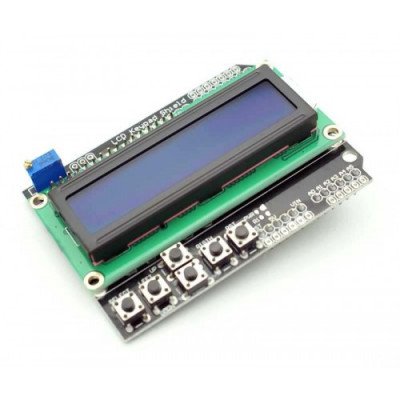
Description:- 16×2 Keypad LCD Shield is a solution for Arduino lovers those who want to work with LCD and arduino without using external switches. It includes a 2×16 LCD display and 6 momentary push buttons. Pins 4, 5, 6, 7, 8, 9 and 10 are used to interface with the LCD. Just one Analog Pin 0 is used to read the five pushbuttons. The LCD shield supports contrast adjustment and back-lit on/off functions. It also exposes five analog pins for easy analog sensor plugging and display. An on board power LED is also provided. This design is great since easily lets you keep connecting sensors to the rest of the pins, and use it for monitoring or menu selection with the push buttons even for gaming. Often project applications require testing or debugging. Displaying information right away help on most occasions when a computer is not at reach. If you are planning to build something not attached to a computer and you need to check what is going on when you place it on position, this addition will prove very valuable to make sure the program is running well. The used LCD pins are not exposed on top side of the board leaving only the unused ones. This way, conflict with LCD pins on top of the board will not happen anymore. Specifications:- Blue Backlight with white words uses 4 Bit Arduino LCD Library Left, Right, Up, Down and Select buttons Screen contrast adjustment Arduino Reset button Operating Voltage is 5V Pin Connections:- Pin Function Analog 0 Buttons (select, up, right, down and left) Digital 4 DB4 Digital 5 DB5 Digital 6 DB6 Digital 7 DB7 Digital 8 RS (Data or Signal Display Selection) Digital 9 Enable * Product Images are shown for illustrative purposes only and may differ from actual product.
Refunds
Once a purchased software package has been activated or an activation has been attempted through an online activation site, the package becomes none refundable But in serious matters, we can refund on gelatissimotp wallet. So you can use every product. We cannot add the software package to our stock if an activation has been completed or attempted.
We cannot issue a refund if a customer has purchased the wrong product. Rather then we can change it if he not try to active it
Example: A customer purchases a Windows software package for a Mac machine.
Exchanges
Microsoft Softwares will exchange software purchases for up to 30 days after order completion but only if the software has not been downloaded by the customer, you can also return your purchased software within 30 days if the software remains none downloaded for a full refund.
Redemption or Activation:
After purchasing keys, you will get a voucher code which is needed to redeem. this voucher code have a lifetime validity but once redeem it then you need to activate your windows or office within 7 working days.
Refund process
Refunds will be credited back to the credit/debit card that customers used to place their order, refunds are processed from our platform immediately the time taken to credit to the customer depends entirely on the customers card issuer and/or bank account.
How to initiate a Refund/Exchange
For any refund or exchange please open a create a refund or exchange request ticket here.




 Grocery/Shopping Bags
 Microcontrollers
 Folders & Document Holders
 Touch Sensor
 Custom Catchers Mitts
 Protective Gear Cricket